Use Terraform to upgrade Managed Kubernetes cluster on Creodias
You can use Terraform to upgrade an existing Creodias Managed Kubernetes cluster to the next available minor Kubernetes version. This article shows how to import the cluster into Terraform state, review the proposed change, and upgrade it from Kubernetes 1.33 to 1.34.
What this article covers
Prerequisites
No. 1 Hosting account and dashboard access
You need an active Creodias account and access to the Creodias Managed Kubernetes dashboard at https://managed-kubernetes.creodias.eu.
No. 2 Existing Managed Kubernetes cluster
Have the cluster name and Cluster ID ready. Check the cluster’s current Kubernetes version and select an available target version in the next minor release. Or, you can create a new one, by following this article: How to create a Kubernetes cluster using the Creodias Managed Kubernetes launcher GUI or, maybe, this article Create a Managed Kubernetes Cluster with Terraform on Creodias.
You will also need the openstack and kubectl commands to be operational.
No. 3 Managed Kubernetes API token
Terraform needs an API token with permission to read and update the cluster. Follow Obtain Creodias Managed Kubernetes API token, then keep the generated token available without storing it in the Terraform configuration.
No. 4 Cluster backup
Create a backup before upgrading. Instructions are available in Managed Kubernetes Backups on Creodias.
Preparation
Here are the two screens if you were creating the new Kubernetes cluster specifically for this article:
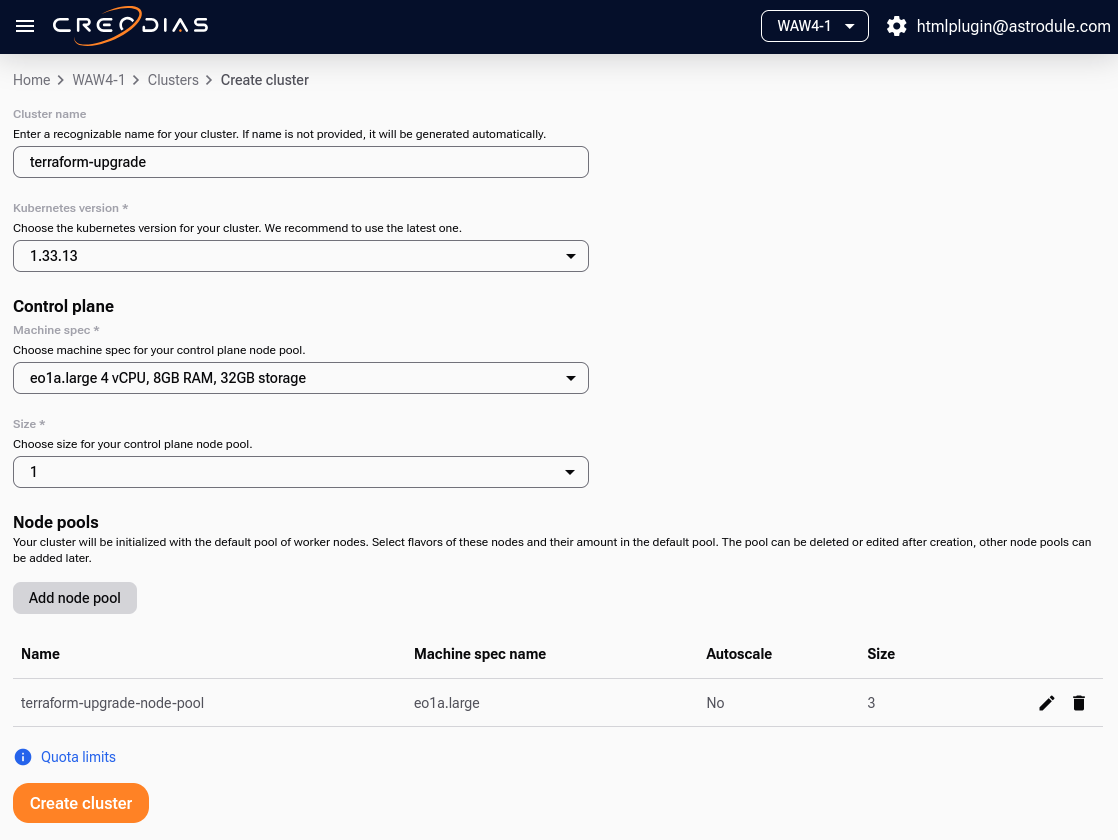
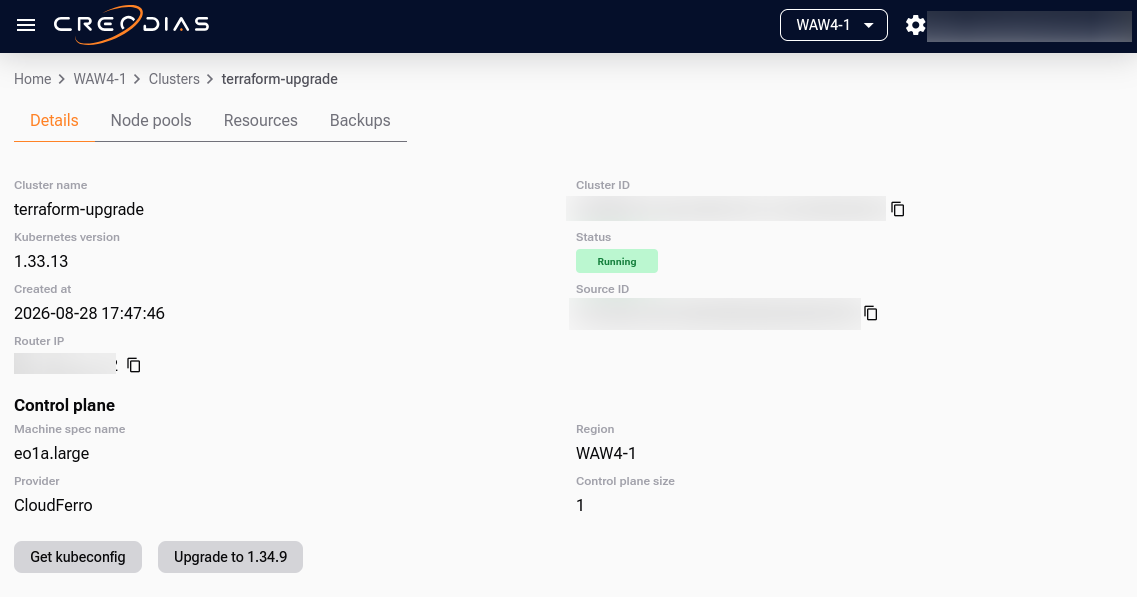
Read and store the value of Cluster name as well as the Cluster ID from this screen, as these will be needed later for main.tf.
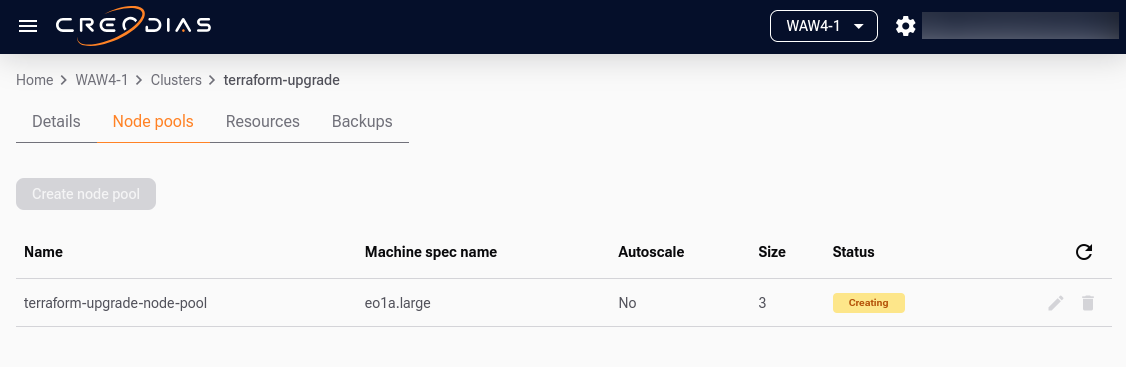
The node pool might look like this:
The token could look like this:
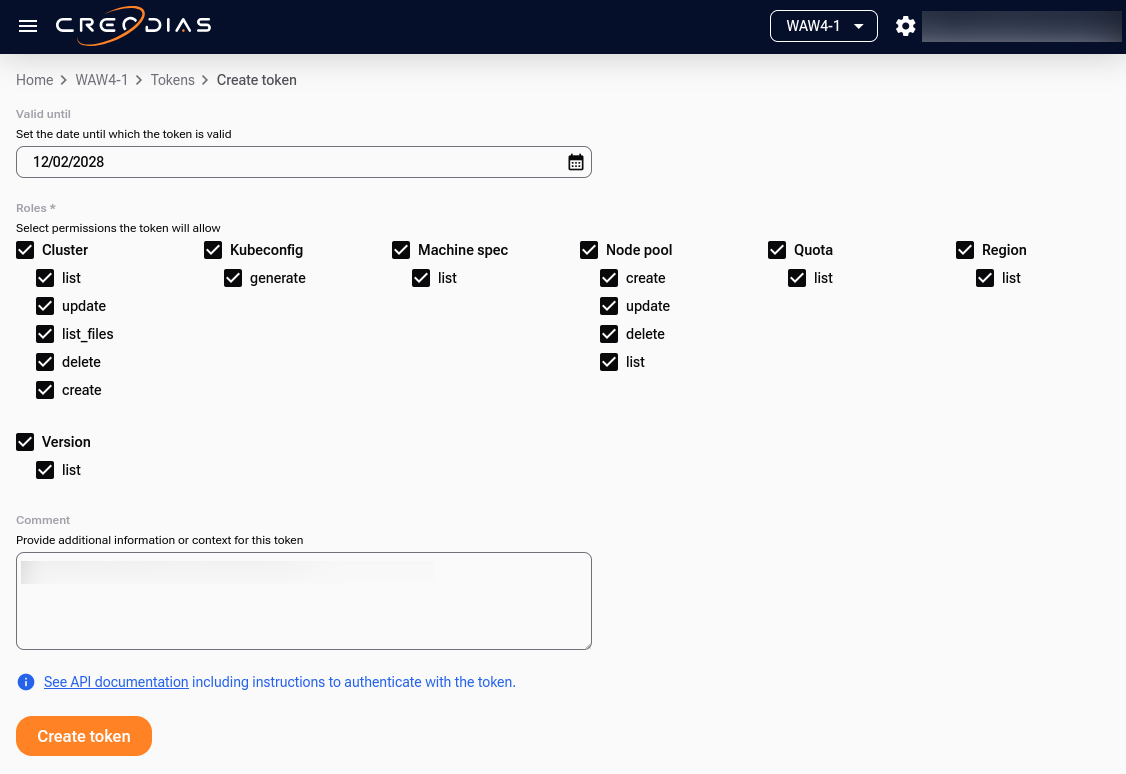
Again, save the token value as it will be needed for TF_VAR_api_token environmental variable.
Verify or install Terraform
Check whether Terraform is already installed:
terraform -version
If the command is not available, install Terraform:
sudo apt update
sudo apt install terraform
Run terraform -version again to confirm that the installation succeeded.
Create the Terraform configuration
Create a working directory and enter it:
mkdir -p ~/mks-upgrade
cd ~/mks-upgrade
Create main.tf:
nano main.tf
Add the following configuration. Replace YOUR-CLUSTER-NAME with the name of the existing cluster. The example uses Kubernetes 1.34.9 as the target version. Use the tab that matches the region of the cluster:
terraform {
  required_version = ">= 1.5.0"

  required_providers {
    cloudferro = {
      source  = "registry.terraform.io/cloudferro/cloudferro"
      version = "0.2.1"
    }
  }
}

variable "api_token" {
  description = "CloudFerro API token"
  type        = string
  sensitive   = true
}

provider "cloudferro" {
  host  = "managed-kubernetes.fra1-3.cloudferro.com:443"
  token = var.api_token
}

resource "cloudferro_kubernetes_cluster_v1" "upgrade_test" {
  name    = "terraform-upgrade"
  version = "1.34.9"

  control_plane = {
    flavor = "eo1a.large"
    size   = 1
  }
}

output "cluster_id" {
  value = cloudferro_kubernetes_cluster_v1.upgrade_test.id
}

output "reported_version" {
  value = cloudferro_kubernetes_cluster_v1.upgrade_test.version
}
terraform {
  required_version = ">= 1.5.0"

  required_providers {
    cloudferro = {
      source  = "registry.terraform.io/cloudferro/cloudferro"
      version = "0.2.1"
    }
  }
}

variable "api_token" {
  description = "CloudFerro API token"
  type        = string
  sensitive   = true
}

provider "cloudferro" {
  host  = "managed-kubernetes.lcj1-1.cloudferro.com:443"
  token = var.api_token
}

resource "cloudferro_kubernetes_cluster_v1" "upgrade_test" {
  name    = "terraform-upgrade"
  version = "1.34.9"

  control_plane = {
    flavor = "eo1a.large"
    size   = 1
  }
}

output "cluster_id" {
  value = cloudferro_kubernetes_cluster_v1.upgrade_test.id
}

output "reported_version" {
  value = cloudferro_kubernetes_cluster_v1.upgrade_test.version
}
terraform {
  required_version = ">= 1.5.0"

  required_providers {
    cloudferro = {
      source  = "registry.terraform.io/cloudferro/cloudferro"
      version = "0.2.1"
    }
  }
}

variable "api_token" {
  description = "CloudFerro API token"
  type        = string
  sensitive   = true
}

provider "cloudferro" {
  host  = "managed-kubernetes.waw4-1.cloudferro.com:443"
  token = var.api_token
}

resource "cloudferro_kubernetes_cluster_v1" "upgrade_test" {
  name    = "terraform-upgrade"
  version = "1.34.9"

  control_plane = {
    flavor = "eo1a.large"
    size   = 1
  }
}

output "cluster_id" {
  value = cloudferro_kubernetes_cluster_v1.upgrade_test.id
}

output "reported_version" {
  value = cloudferro_kubernetes_cluster_v1.upgrade_test.version
}
The resource configuration must describe the existing cluster, apart from the intended version change. Do not assume that the example control-plane flavor and size match your cluster; you will compare them with the imported state before applying the configuration.
Provide the API token
Export the token as the Terraform input variable:
export TF_VAR_api_token="<PASTE-YOUR-TOKEN-HERE>"
The variable is marked as sensitive, but the token is still present in the environment of the current shell. Do not save it in main.tf or commit it to Git.
Initialize Terraform and import the cluster
Initialize the working directory:
terraform init
Import the existing cluster into the resource defined in main.tf. Replace the final placeholder with the Cluster ID, not the cluster name:
terraform import \
  cloudferro_kubernetes_cluster_v1.upgrade_test \
  PASTE-YOUR-CLUSTER-ID-HERE
Inspect the imported state:
terraform state show cloudferro_kubernetes_cluster_v1.upgrade_test
This is the result:
terraform state show cloudferro_kubernetes_cluster_v1.upgrade_test
# cloudferro_kubernetes_cluster_v1.upgrade_test:
resource "cloudferro_kubernetes_cluster_v1" "upgrade_test" {
    control_plane = {
        flavor = "eo1a.large"
        size   = 1
    }
    id            = "<CLUSTER ID>"
    kubeconfig    = (sensitive value)
    metadata      = {
        openstack_project_id = "<OPENSTACK-PROJECT-ID>"
    }
    name          = "terraform-upgrade"
    router_ip     = "XX.YY.ZZ.AA"
    version       = "1.33.13"
}
Compare the output with main.tf and adjust the resource configuration so it describes the existing cluster. Keep version = "1.34.9" as the intended target version, or replace it with another supported version in the next minor release.
Before the upgrade
kubectl get nodes -o wide

NAME                                                      STATUS   ROLES           VERSION    INTERNAL-IP
control-59d0f195-dccc-43db-8f67-ed510d5ea2a0-k25wf        Ready    control-plane   v1.33.13   10.6.0.232
worker-2cfbef29-4780-4b7a-966a-7375474a46b5-glr2c-8qbdt   Ready    <none>          v1.33.13   10.6.0.158
worker-2cfbef29-4780-4b7a-966a-7375474a46b5-glr2c-s457g   Ready    <none>          v1.33.13   10.6.0.195
worker-2cfbef29-4780-4b7a-966a-7375474a46b5-glr2c-zk2xd   Ready    <none>          v1.33.13   10.6.0.79
Review and apply the upgrade
Preview the changes:
terraform plan
This is the plan:
terraform plan
cloudferro_kubernetes_cluster_v1.upgrade_test: Refreshing state... [id=<VALUE OF ID>]

Terraform used the selected providers to generate the following execution plan. Resource actions are indicated with the following symbols:
  ~ update in-place

Terraform will perform the following actions:

  # cloudferro_kubernetes_cluster_v1.upgrade_test will be updated in-place
  ~ resource "cloudferro_kubernetes_cluster_v1" "upgrade_test" {
        id            = "<VALUE OF ID>"
      ~ kubeconfig    = (sensitive value)
      ~ metadata      = {
          ~ openstack_project_id = "<OPENSTACK PROJECT ID> -> (known after apply)
        } -> (known after apply)
        name          = "terraform-upgrade"
      ~ router_ip     = "XX.YY.ZZ.AA" -> (known after apply)
      ~ version       = "1.33.13" -> "1.34.9"
        # (1 unchanged attribute hidden)
    }

Plan: 0 to add, 1 to change, 0 to destroy.

Changes to Outputs:
  ~ reported_version = "1.33.13" -> "1.34.9"
Review the complete plan. Continue only if Terraform proposes the intended Kubernetes version upgrade and any other displayed changes are understood and required. Correct main.tf before proceeding if Terraform proposes unintended changes to the cluster configuration.
Apply the configuration:
terraform apply
Review the plan again, type yes, and press Enter. Terraform sends the update request to Creodias Managed Kubernetes, which performs the cluster upgrade.
After the upgrade
kubectl get nodes -o wide

NAME                                                      STATUS   ROLES           VERSION   INTERNAL-IP
control-59d0f195-dccc-43db-8f67-ed510d5ea2a0-v49m6        Ready    control-plane   v1.34.9   10.6.0.120
worker-2cfbef29-4780-4b7a-966a-7375474a46b5-995n8-6s2g6   Ready    <none>          v1.34.9   10.6.0.246
worker-2cfbef29-4780-4b7a-966a-7375474a46b5-995n8-ksbkm   Ready    <none>          v1.34.9   10.6.0.145
worker-2cfbef29-4780-4b7a-966a-7375474a46b5-995n8-nfdnh   Ready    <none>          v1.34.9   10.6.0.251
The names of the pods are different as they have been incrementally switched during the upgrade process; from version 1.33.13 we are now at 1.34.9. The internal IP values have changed as well.
Verify the upgrade
After Terraform finishes, display the version reported by the provider:
terraform output reported_version
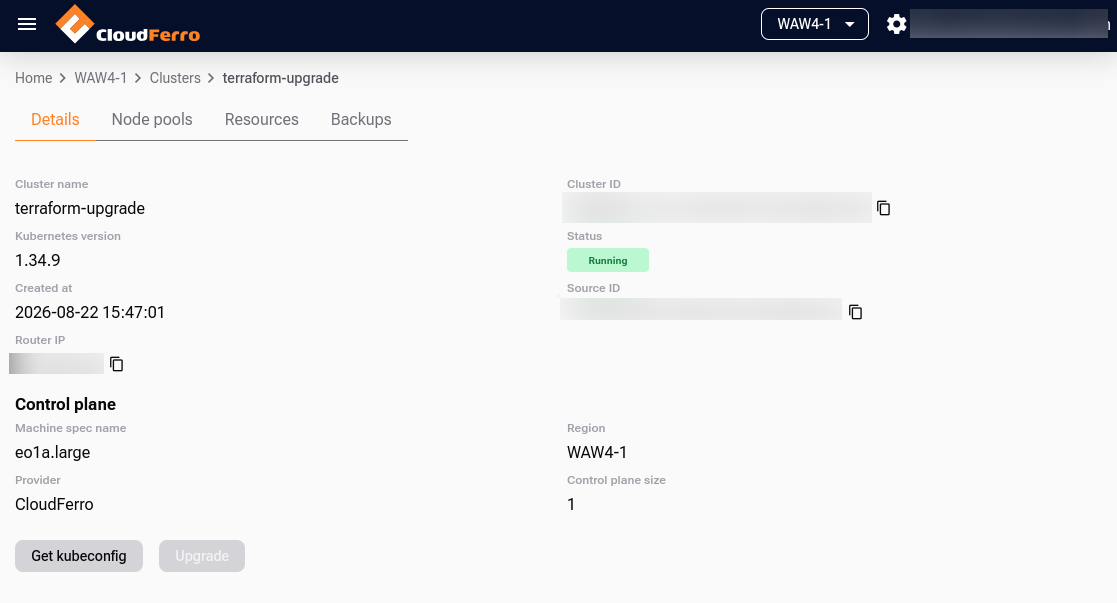
Open the Creodias Managed Kubernetes dashboard and confirm that the cluster reaches the Running state with the target Kubernetes version. Also verify that:
all nodes are Ready;
system workloads, including DNS, networking, and storage, are healthy;
your key applications and ingress endpoints work.
Upgrade to a newer patch version
You can use the same workflow for an available patch-version upgrade. For example, to upgrade a cluster from Kubernetes 1.34.8 to 1.34.9, change the version in main.tf:
# Before
version = "1.34.8"

# After
version = "1.34.9"
Preview the update:
terraform plan
Confirm that the plan proposes the version change from 1.34.8 to 1.34.9 without unintended configuration changes, then apply it:
terraform apply
Type yes when prompted. After the upgrade finishes, repeat the verification steps from the previous section.
This would be the end result:
What to do next
For the alternative dashboard procedure, see Upgrade Managed Kubernetes cluster on Creodias.